
Compare point of sale by the whole order path
A POS demo is a screen with buttons on it. What you are actually buying is what happens between a guest deciding and a ticket hitting the pass.
Trusted by food trucks, pop-ups, and independent kitchens


How should I compare restaurant POS systems?
Compare them on the path an order takes, not the feature list. Walk one ticket from the guest to the kitchen to the payout, and score each system on how many awkward steps it adds. Then check five things that comparison tables hide: what happens when the internet drops, who owns the guest data, how online orders arrive, what the hardware really costs, and what the contract does in year two. Operators commonly shortlist Toast, Square for Restaurants, Lightspeed, Clover, and TouchBistro, and the right answer depends on your service model far more than on the brand.
Restaurant POS systems comparison
Match the system to your service model
Half of POS regret is a full-service system bought by a counter-service business, or the reverse.
- Full service: table management, coursing, seat-level splits, and server handoffs. Heavier, and worth it if you have a dining room.
- Counter and quick service: speed of ringing, modifiers, and a fast payment tap. Screens matter more than floor plans.
- Trucks, pop-ups, and markets: something that runs on a phone, survives a bad signal, and does not need a counter to sit on.
- Catering and events: deposits, pickup windows, and large tickets planned days ahead.
The five questions comparison tables skip
Ask these in the demo and write the answers down.
- What happens when the internet drops mid-service, and what syncs back when it returns?
- Who owns the guest contact details, and can you export them today?
- How does an online order arrive, and does it take a keystroke from someone during a rush?
- What is the true hardware cost, including the stand, the printer, the cash drawer, and the spare?
- What is the term, the notice period, and the price when the promotional year ends?
Where the online ticket lands
This is the seam where most setups leak. If online orders arrive in a separate tablet, somebody has to watch two screens during the rush, and on a busy Saturday that person is you. Ask to see an online order and a counter order land in the same place, in the same demo, before you believe it happens.
Payments and payouts
Three separate questions get bundled into one number. What is the processing rate? Whose merchant account does the money land in? And how quickly does it reach your bank? A slightly better rate is not worth a slower payout if you are buying produce on Thursday.
Total cost over two years
Add the software, the processing, the hardware, the add-on modules, and the online ordering fees. Then divide by two years of your real order volume. That is the number to compare, and it is often a long way from the one on the slide.
Score every system on the same ten
Print this. Same ten questions, same demo, and the differences stop being marketing.
- 01Can I ring my most complicated item, with every modifier, in under thirty seconds?
- 02Where does an online order appear, and does it need a tap to accept?
- 03How does the kitchen see the ticket, on paper or a screen?
- 04What happens offline, and what comes back when the signal returns?
- 05What guest data do I keep, and how do I export it?
- 06What is the processing rate and whose account holds the money?
- 07What does the full hardware kit cost, with a spare?
- 08What is included, and what is an add-on module?
- 09What is the contract term and the renewal price?
- 10Who answers on a Saturday night, and how fast?
Where Outbites fits
Outbites is a phone-first register plus the online order path in one account. That combination suits some businesses very well and others not at all, so here is the honest line.
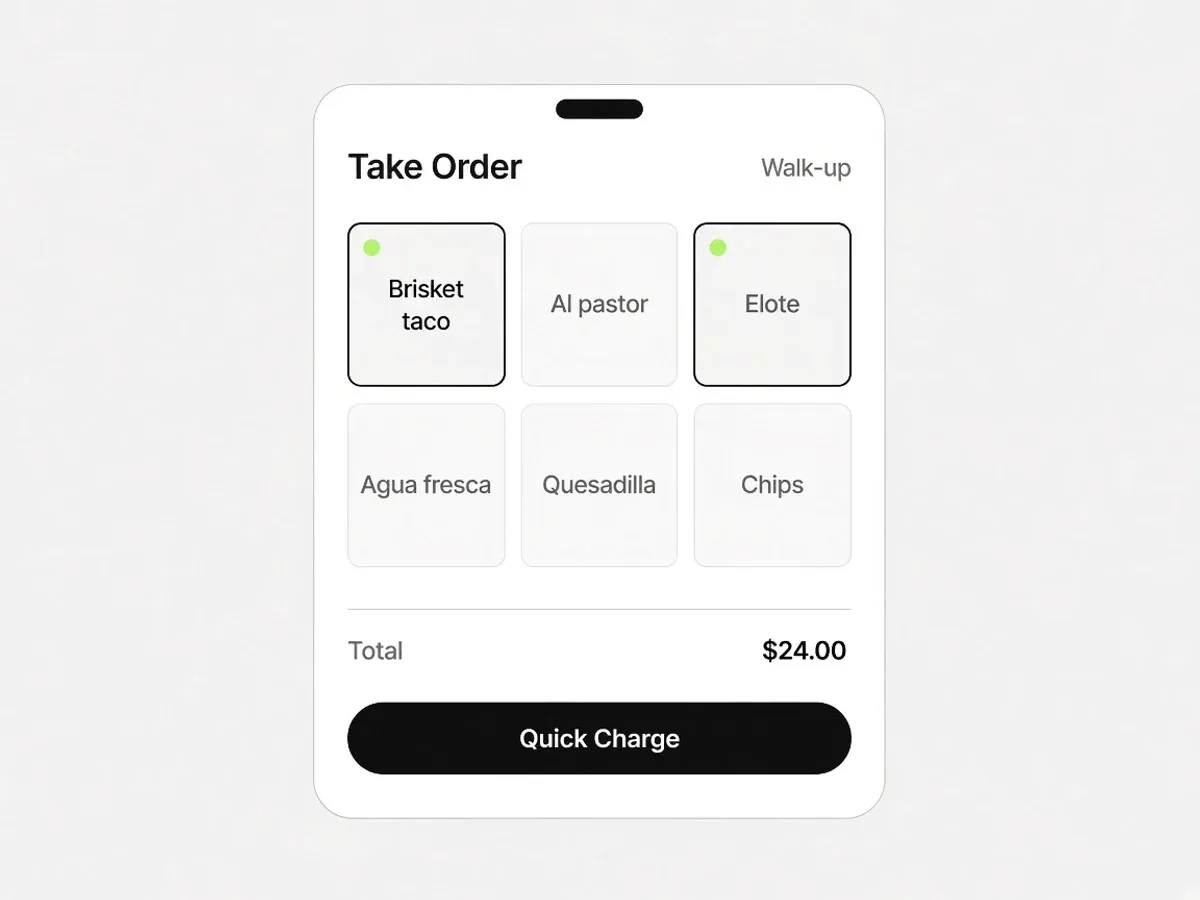
- Good fit: a truck, a window, a pop-up, or a counter that wants the register in an apron pocket, a tap on the phone, or a Bluetooth reader for tip, tap, and dip.
- Good fit: you want online tickets and walk-up tickets on the same live board, because they already are.
- Poor fit: a dining room that needs table management, coursing, and seat-level splits.
- Worth knowing: Take Order runs in the Outbites mobile app. Pair Stripe or Square. In-person tap and Bluetooth reader payments use Square today, and Stripe in person is coming. There is no Toast or Clover connector.
Frequently asked questions
What operators ask us about restaurant pos systems comparison.
What are the best POS systems for restaurants?
Operators commonly compare Toast, Square for Restaurants, Lightspeed Restaurant, Clover, and TouchBistro, and each one is genuinely good at a different service model. The best choice depends on whether you run a dining room, a counter, or a truck, plus your hardware, payments, and reporting needs. Compare them on the path an order takes rather than on the feature count.
Should online ordering be built into the POS?
Built-in ordering is convenient, but check three things before you accept it: what the guest-facing page looks like on a phone, what customer data you keep, and what it costs per order. Plenty of restaurants run a POS for the counter and a separate direct ordering platform because the second one is better at winning the repeat guest.
Can Outbites replace my POS?
For a truck, a window, or a counter, often yes. Take Order rings up walk-ups on the phone or tablet you already have. Take a tap on a compatible iPhone, or pair a Bluetooth reader, and those tickets share a board with your online orders. For a full-service dining room with table management and coursing, no. Outbites does not integrate with Toast or Clover either, so if you are keeping one of those, Outbites sits beside it as your direct ordering channel.
What POS integration questions should I ask?
Ask about menu sync, order routing, modifier mapping, tax handling, refunds, what the reports show, what happens during downtime, and who you call when the connection breaks. Get the last one in writing: integrations tend to be owned by nobody until they fail.
Food businesses taking orders on their own link
Named Austin kitchens, in their own words.
“This is the first stack that actually moved the needle on direct online revenue.”
Aisha B.
“Less money lost to middlemen and a lot more orders coming straight to us.”
Renee J.
“Branded ordering on our own site. Guests notice and the average ticket keeps climbing.”
Grace C.
“Service runs tighter. Fewer fire drills on the line and fewer missed calls up front.”
Andre Z.
“We keep the full ticket on pickup, and delivery costs stay small and predictable.”
Maya V.
“We close late. I have never waited long for a real person when something breaks.”
Luis O.
“We are steering volume off third-party marketplaces and putting dollars back in-house.”
Chris D.
“It helps independents stand next to the chains without a seven-figure tech budget.”
Tara E.
“Setup was painless. Online sales picked up faster than we budgeted for.”
James W.
“Orders go out smoothly and our promos are finally getting real traction.”
Elena R.
“We outgrew our old DIY site. Web sales are up well over half year over year.”
Ben Y.
“Our site finally matches the restaurant, and someone walked us through every tweak.”
Sofia M.
“I'm a vampire. The truck only parks after dark, garlic is off the menu, and guests still order from the QR on the window.”
Lenore V.
Reading is cheaper than switching. Trying is cheaper than both.
Create an account, add one item, and take a test order on your own phone before you commit to anything.
- $1 per fulfilled order
- No monthly platform fee
- We never hold your payouts
- Cancel anytime